HTTP Status Codes Cheat Sheet: Every Common Code Explained
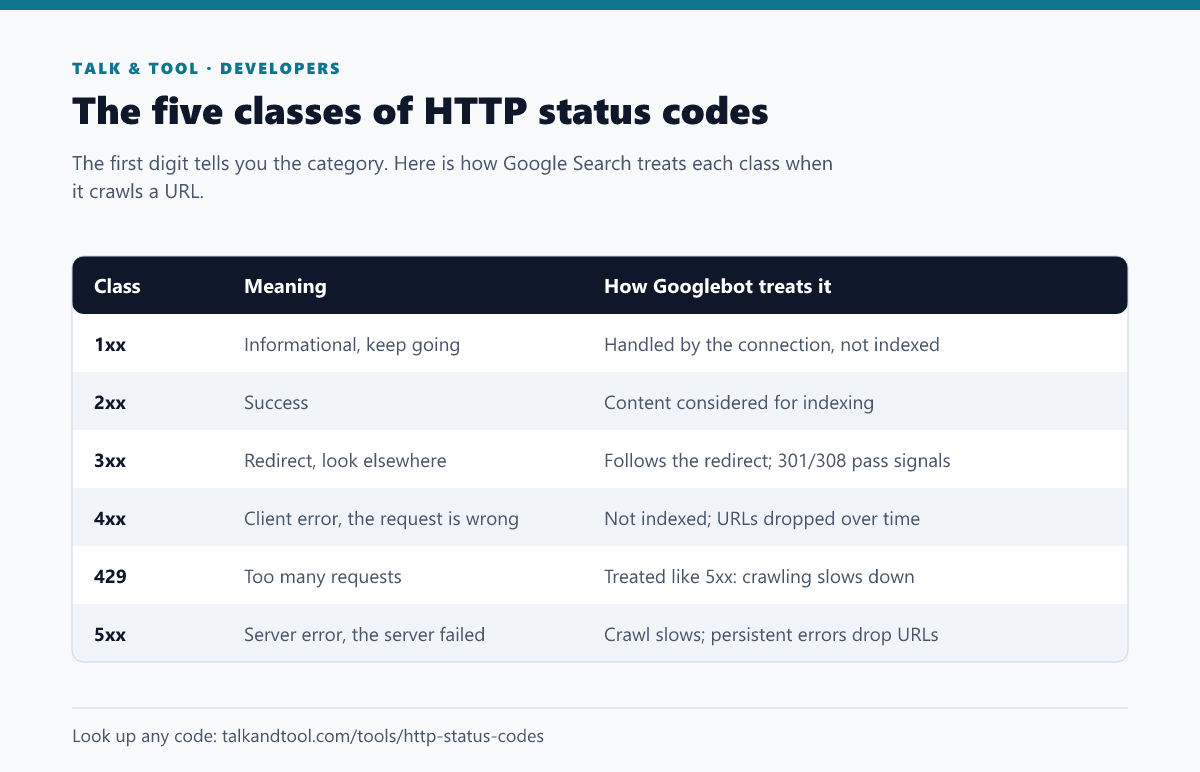
HTTP status codes are three-digit numbers a server returns with every response. The first digit gives the category: 2xx means success, 3xx a redirect, 4xx a problem with the request, and 5xx a problem with the server. Here is what the codes you will actually meet mean, when to use each one, and how Google treats them.
The five classes
2xx: success
- 200 OK: the request worked and the body contains the result. This is what every indexable page should return.
- 201 Created: a new resource was created, typically after a POST to an API. Usually paired with a
Locationheader pointing at it. - 204 No Content: success with nothing to return, common for DELETE requests and some form submissions.
Soft 404 warning: a page that says "not found" but returns 200 is a soft 404. Google will usually detect and exclude it, but it wastes crawl budget and shows up as an error in Search Console. Missing pages should return a real 404 or 410.
3xx: redirects
- 301 Moved Permanently: the URL has moved for good. Google transfers ranking signals to the target and eventually shows the new URL. Use it for site migrations, changed slugs and merged pages.
- 302 Found: a temporary move. Google keeps the original URL indexed at first, though a 302 left in place for a long time can be treated like a permanent redirect.
- 303 See Other: redirect to a different resource, typically after a form POST so a refresh does not resubmit it.
- 304 Not Modified: the cached copy is still valid. It saves bandwidth, and Googlebot uses conditional requests to crawl more efficiently.
- 307 Temporary Redirect / 308 Permanent Redirect: like 302 and 301, but the request method and body must not change. That matters for APIs, while for SEO a 308 behaves like a 301.
We compared 301 and 302 in more depth in 301 vs 302 and the status codes that decide whether your pages rank. Avoid chains: Googlebot follows up to 10 redirect hops, but every extra hop slows users down and delays processing.
4xx: client errors
- 400 Bad Request: the request is malformed, for example invalid JSON in an API body. See why your JSON is invalid for the usual culprits.
- 401 Unauthorized: authentication is required or failed. Despite the name, it means "not authenticated".
- 403 Forbidden: authenticated or not, you may not access this. Accidentally returning 403 to Googlebot, often via a firewall or bot-protection rule, will get pages dropped.
- 404 Not Found: nothing exists at this URL. It is perfectly normal for pages that never existed or were removed. 404s do not hurt the rest of your site.
- 405 Method Not Allowed: the URL exists but not for this method, such as a POST to a read-only endpoint.
- 408 Request Timeout: the client took too long to send the request.
- 410 Gone: removed deliberately and permanently. Google treats it much like a 404, sometimes dropping the URL slightly faster. Use it when you want to be explicit.
- 418 I'm a teapot: an April Fools' joke from 1998 that many frameworks still implement. Do not use it in production.
- 422 Unprocessable Content: the request is well-formed but fails validation, such as a missing required field. It is common in REST APIs.
- 429 Too Many Requests: rate limit exceeded. Include a
Retry-Afterheader. Googlebot treats 429 like a server error and slows its crawl. - 451 Unavailable For Legal Reasons: blocked for legal reasons, such as a court order or regional restriction.
5xx: server errors
- 500 Internal Server Error: a generic failure, usually an unhandled exception. Check the server logs.
- 502 Bad Gateway: a proxy or load balancer got an invalid response from the server behind it, which often means the application crashed or is restarting.
- 503 Service Unavailable: temporarily down, for maintenance or overload. This is the correct code for planned downtime. Add
Retry-After, and Google will keep your pages indexed for a short outage. - 504 Gateway Timeout: the upstream server did not respond in time, often a slow database query or external API.
How Google handles them: 5xx and 429 responses make Googlebot slow down crawling. If the errors persist for days, URLs that keep failing are eventually dropped from the index. A brief outage returning 503 is harmless. A site returning 200 with an error message during an outage risks having error pages indexed.
Checking which status a URL returns
- Browser DevTools: open the Network tab, reload, and look at the Status column for the document request.
- Command line:
curl -I https://example.com/pageprints the status line and headers. Add-Lto follow redirects and see each hop. - Search Console: URL Inspection shows the status Googlebot got. The Pages report groups URLs by the reason they are not indexed.
For a searchable reference of every registered code with examples, use the HTTP status codes lookup.
Frequently asked questions
Should I redirect all 404s to the homepage?
No. Google treats mass redirects to the homepage as soft 404s, and users land somewhere irrelevant. Redirect only to a genuinely equivalent page, and let the rest return 404.
Is 404 or 410 better for removed pages?
Both work. 410 is more explicit and may be processed slightly faster, but the practical difference for SEO is small.
Which status code should maintenance pages return?
503 Service Unavailable, ideally with a Retry-After header. Never 200 or 404.