ASCII vs UTF-8 vs Unicode: What’s the Difference?
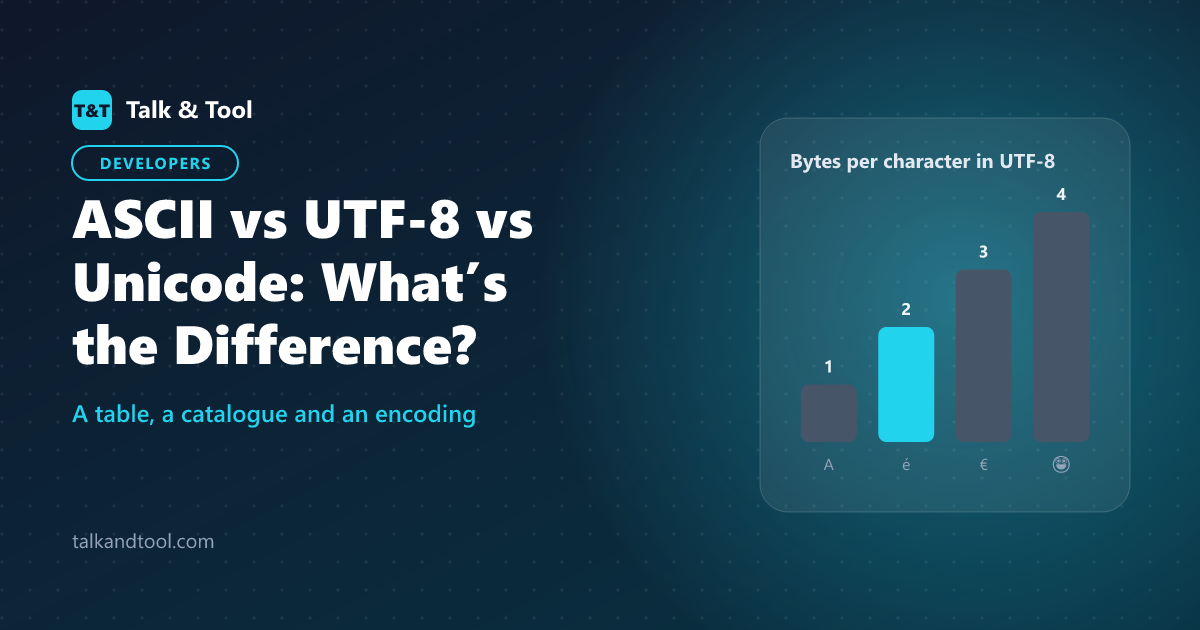
ASCII is a small table that gives 128 characters a number. Unicode is a much larger catalogue that gives every character in every writing system its own number, called a code point. UTF-8 is a way of storing those Unicode numbers as bytes, using one byte for ASCII characters and up to four for everything else. They are not rival standards: UTF-8 is an encoding of Unicode that happens to match ASCII for the first 128 characters.
ASCII: the original 128
ASCII, from 1963, assigns the numbers 0 to 127 to English letters, digits, punctuation and some control codes. A is 65, a is 97, 0 is 48, and the space is 32. Because 128 values fit in seven bits, ASCII text needs only 7 bits per character, though it is almost always stored in an 8-bit byte with the top bit set to 0.
The weakness is obvious: there is no room for é, ü, ñ, Ω, Arabic, Chinese, or emoji. In the 1980s and 90s, different systems filled the unused upper half with different characters ("code pages"). A file written on one computer could display as nonsense on another. That mess is what Unicode set out to end.
Unicode: one number per character
Unicode defines a code point for each character, written as U+ followed by hex digits. Capital A is U+0041, the euro sign is U+20AC and the grinning-face emoji is U+1F600. There are over 150,000 assigned characters across more than 150 scripts, with room for over a million code points (up to U+10FFFF).
Unicode itself says nothing about how those numbers are stored. That is the job of an encoding.
UTF-8: the encoding that won
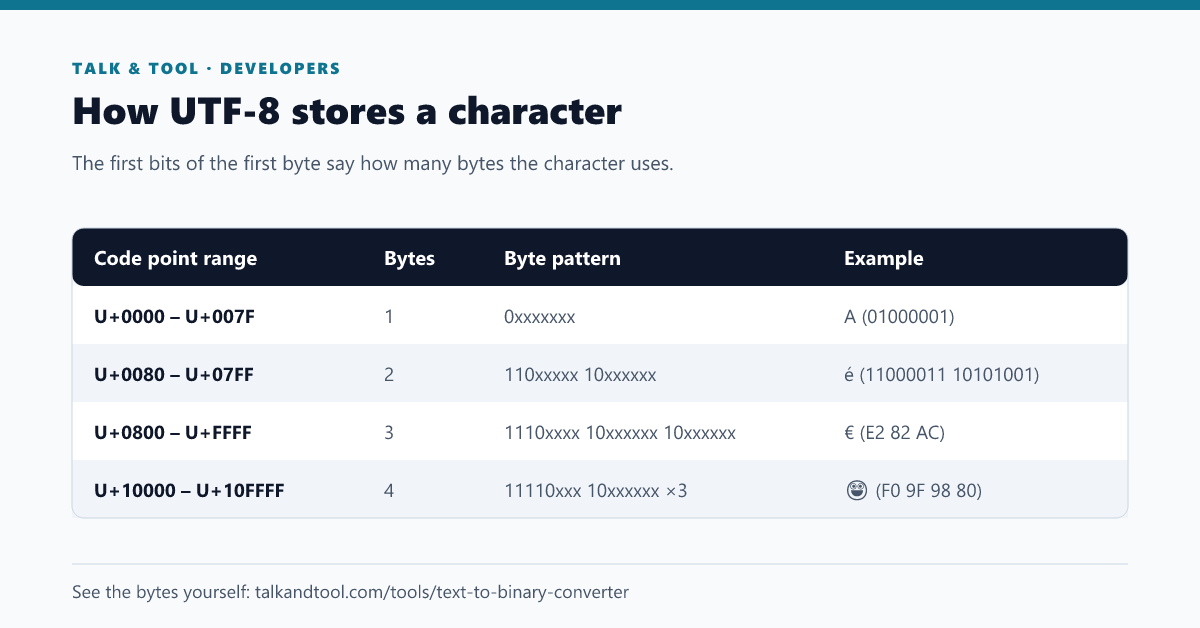
UTF-8 stores each code point in one to four bytes. It is variable length: common characters take little space and rare ones take more. The patterns are in the table above. Three properties explain its dominance:
- Backward compatible with ASCII. Any ASCII file is already a valid UTF-8 file, with identical bytes.
- Self-synchronising. Continuation bytes begin with 10, so if a stream is cut you can find the next character start without reading from the beginning.
- No byte-order problem. Unlike UTF-16 and UTF-32, UTF-8 reads the same on every machine, so it needs no byte-order mark.
More than 98% of web pages are served as UTF-8, and it is the default for HTML5, JSON, and most programming languages and operating systems today.
Worked example: encoding the euro sign
The euro sign is U+20AC. In binary that is 0010 0000 1010 1100, which falls in the three-byte range. Fit those 16 bits into the pattern 1110xxxx 10xxxxxx 10xxxxxx:
- First 4 bits 0010 go into the first byte: 11100010 = E2
- Next 6 bits 000010 go into the second: 10000010 = 82
- Last 6 bits 101100 go into the third: 10101100 = AC
The result is the bytes E2 82 AC. You can check any character this way with the text to binary converter, which shows the real UTF-8 bytes in binary, hex, decimal or octal.
UTF-16, UTF-32 and why they exist
UTF-16 uses two bytes for most characters and four for the rest; Windows internals, Java strings and JavaScript strings use it. UTF-32 uses four bytes for every character, which makes indexing simple but wastes space. Neither is common for files on disk or on the web. When you read about "string length" in JavaScript giving 2 for an emoji, this is why: JavaScript counts UTF-16 code units, and an emoji outside the basic range takes two of them.
Common problems and how to spot them
- Mojibake such as "é" instead of é. UTF-8 bytes were read as a single-byte encoding like Windows-1252. The fix is to declare or read the file as UTF-8.
- Question marks or black diamonds. The text was converted to an encoding that cannot represent the characters, and they were replaced.
- A stray "BOM" at the start. A byte-order mark (EF BB BF) in a UTF-8 file confuses some parsers. Save without it.
- Length mismatches. A database column limited to 255 bytes may hold fewer than 255 characters when accents or emoji are involved.
- Broken URLs. Non-ASCII characters in a URL must be percent-encoded as their UTF-8 bytes; the URL encoder does this, and the HTML entity encoder handles characters in HTML.
Always declare UTF-8 in HTML with <meta charset="utf-8"> and in HTTP headers, and use it as the default everywhere new.
How this relates to other encodings
UTF-8 is a text encoding; Base64 is a way to represent arbitrary bytes using 64 safe characters, covered by the Base64 tool. For a hands-on introduction to turning characters into bits, see how to convert text to binary. Token counts for language models also depend on how text is broken into bytes and pieces; our guide to counting tokens for an LLM explains that side.
Frequently asked questions
Is UTF-8 the same as Unicode?
No. Unicode is the character set (the numbering). UTF-8 is one way to store it in bytes. Others include UTF-16 and UTF-32.
Is ASCII still used?
Yes, as a subset. Every ASCII character keeps the same code in UTF-8, so protocols, programming languages and file formats built on ASCII still work.
How many bytes is an emoji in UTF-8?
Most are four bytes. Some emoji are sequences of several code points joined together, such as flags or family emoji, and can take 8 to 25 bytes.
Why does UTF-8 use a variable length?
It keeps English text compact while still covering every writing system. A fixed 4-byte encoding would make plain English files four times bigger.