What Is a Good CTR in Google Search Console? (By Position)
A good CTR in Google Search Console depends almost entirely on position. Roughly 25–30% is typical at position 1, about 6% at position 5, and 2–3% at position 10. So the useful question is not "is my CTR good?" but "is this page's CTR good for the position it holds?" Here are the benchmarks and how to use them.
Why your site-wide CTR is misleading
The CTR at the top of the Performance report averages every impression your site received, including all the queries where you rank on page five. For a new site that number can look alarming. In its first two weeks in Search Console, talkandtool.com recorded 7,555 impressions and 3 clicks, a CTR of 0.04%. Nothing was wrong with the titles. The average position was around 70, where almost nobody clicks.
As a site gains rankings, its average CTR rises without anyone touching a title. That is why a site-wide CTR trend mostly tracks rankings, not snippet quality. To judge the snippet, you have to control for position.
CTR benchmarks by position
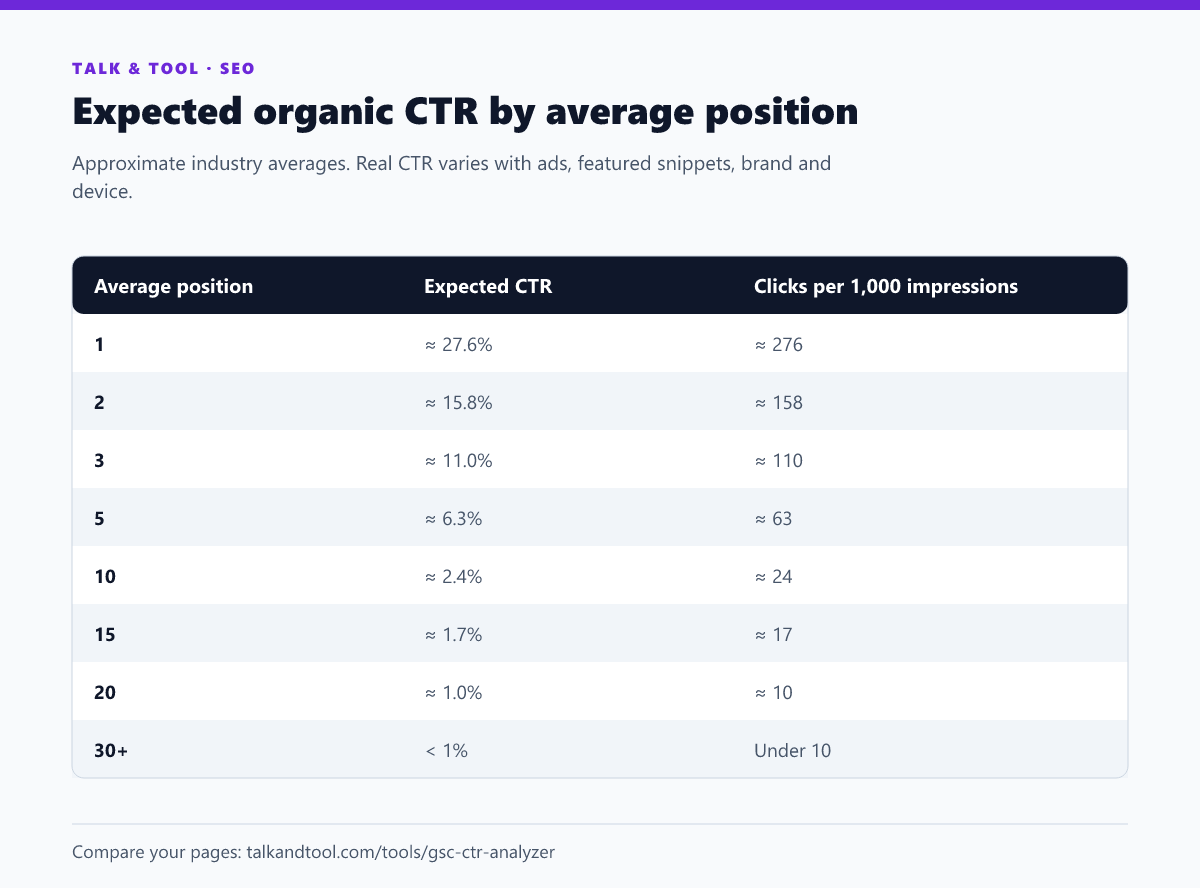
These numbers follow the range published by large industry CTR studies. Treat them as a yardstick. Some search types consistently beat or miss them:
- Branded queries often get CTRs far above the curve. People searching your name want you.
- Queries with a featured snippet, AI overview, ads or a map pack push the organic results down, so CTR at position 1 can be half the benchmark.
- Answer-style queries ("what is 15% of 80") can have very low CTR because the result page answers them directly.
- Mobile and desktop differ, so compare like with like using the Device filter.
How to find pages with below-par CTR
- In Search Console, open Performance → Pages with clicks, impressions, CTR and position enabled, for the last three months.
- Export the table, and for each page compare its CTR with the expected CTR for its average position.
- Rank pages by the clicks you are missing: impressions × (expected CTR − actual CTR). A small gap on a big page beats a big gap on a tiny one.
- Focus on pages ranking in the top ten. Below that, position is the bottleneck, not the snippet.
The Search Console CTR analyzer does this from an upload: it compares every page with the expected curve and lists the underperformers by estimated missed clicks.
How to improve a low CTR
Rewrite the title for the query people actually use
Open the page's Queries tab. If most impressions come from a phrasing your title does not use, put that phrasing in the title. Searchers scan for their own words, and Google bolds them.
Keep the title within the displayed width. See SEO title length and pixel limits, and check it with the title and meta description checker.
Write a meta description that sells the click
Google shows your description when it matches the query well. Lead with the answer or outcome, include a specific detail, and give a reason to click. Our guide to meta descriptions that earn the click has examples.
Match the intent shown on page one
If every other result is a calculator and yours is an article, or the reverse, people skip it. Sometimes the fix is adding a tool or a direct answer at the top, not rewording the snippet.
Earn rich results where they are still available
Product, recipe, video, event and review markup can add stars, prices, dates or thumbnails that pull the eye. Many older rich result types have been retired, so check which ones still work in which schema markup still gets rich results.
Show freshness when it matters
For topics that change (prices, rules, software), a visible, genuine "updated" date and the current year in the title can lift CTR. Do not fake it. Changing the date without changing the content is easy for users and Google to see through.
Measuring the change
After updating a snippet, wait until Google shows the new version (check with a search), then compare 28 days after with 28 days before. Compare at a similar average position, because a ranking shift will move CTR on its own. Filter to the page and, ideally, to its top query so seasonality in other queries does not muddy the result.
Frequently asked questions
What is a good average CTR for a whole website?
There is no meaningful benchmark, because it depends on your rankings mix. Sites that rank mostly in the top three can average 10%+. Newer sites with many low-position impressions can sit under 1% and still be healthy.
Why do I have impressions but no clicks?
Usually because the impressions come from low positions, often on pages three and beyond. Check the average position: below about 20, clicks are rare regardless of the snippet.
Does CTR affect rankings?
Google has not confirmed CTR as a direct ranking factor, and it is a noisy signal. But more clicks at the same position is more traffic either way, which is the point.