Search Console Regex: 12 Filters to Copy and Paste
The regex filter in Google Search Console turns the Performance report from a long list of queries into answers: which questions people ask, how much traffic is brand versus non-brand, which long-tail searches you already rank for. Below are twelve patterns you can paste in as they are, and the rules that make a pattern silently return nothing.
Where the regex filter is
- Open Performance → Search results.
- Click + Add filter and choose Query or Page.
- Change the dropdown from "Queries containing" to Custom (regex).
- Choose Matches regex or Doesn't match regex, paste the pattern and apply.
The filter applies to every tab in the report, so a Query filter also narrows the Pages, Countries and Dates views. That is what makes it useful: filter to question queries, then switch to Pages to see which URLs answer them.
Three rules that save an afternoon
1. It is case-sensitive unless you say otherwise
Search Console matches case-sensitively by default. Most queries are lowercase, but URLs and some queries are not, so start patterns with (?i) to ignore case. It must come first; in the middle of a pattern it does not do what you expect.
2. It matches anywhere in the text
A pattern does not need to match the whole query. calculator keeps "loan calculator" and "calculator for gpa". Use ^ for "starts with" and $ for "ends with", and both for an exact match.
3. It is RE2, not the regex you know
Search Console uses Google's RE2 engine, which leaves out features that can make regex slow. Lookaheads like (?!brand), lookbehinds and backreferences like \1 are not supported, and a pattern that uses them does not show an error: the report just comes back empty. For exclusions, use Doesn't match regex instead of a negative lookahead. The Search Console regex generator flags these features before you paste a pattern, and lets you test it against a list of your own queries.
Twelve patterns to copy
Queries people phrase as questions
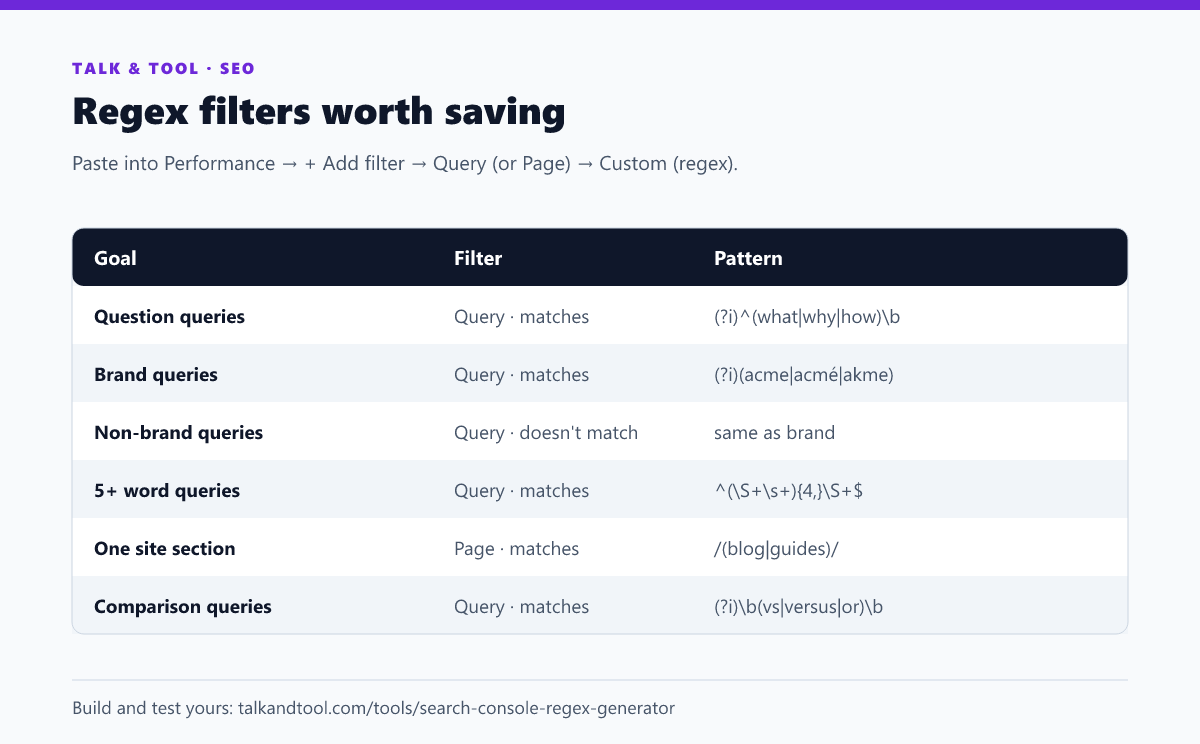
(?i)^(who|what|when|where|why|how|which|can|does|is|are|should)\b
These are the queries a FAQ section or an H2 with a direct answer can win. Sort the result by impressions and look for questions with impressions but no clicks. Each is a heading your page is missing.
Brand and non-brand traffic
(?i)(acme|acmé|akme|acme tools)
Include the misspellings and spacing variants people actually type: check the query list for them. Use the same pattern with Doesn't match regex for non-brand traffic. Non-brand clicks are the number that tells you whether content and rankings are growing, since brand clicks mostly follow your marketing.
Long-tail queries
^(\S+\s+){4,}\S+$ keeps queries of five words or more. Change the 4 to adjust. New sites usually rank for long, specific queries first, so this is where to look for early traction and for groups of queries that deserve their own page. The keyword clustering tool groups an export of them into page-sized topics.
Comparison and alternative queries
(?i)\b(vs|versus|alternative|alternatives|compared|comparison)\b
Comparison queries signal someone close to a decision. If you rank for them on page two, a dedicated comparison section is often enough to move up.
Price and "free" intent
(?i)\b(free|cheap|price|pricing|cost|best)\b
"How to" and tutorial intent
(?i)^how (to|do|can)\b
Queries containing a number or year
\b20[0-9]{2}\b finds queries with a year. If your page title still says last year, these are the clicks you are losing.
Two words in any order
(?i)(keyword.*density|density.*keyword)
RE2 cannot say "contains both words" with lookaheads, so list both orders. With three words that is six orders; the generator writes them for you.
One section of the site (Page filter)
/(blog|guides)/ on the Page filter. On a multilingual site, ^https://example\.com/de/ isolates the German pages so you can compare languages without exporting.
Several specific pages
(/pricing$|/features$|/compare/) tracks a handful of money pages together.
Exact queries only
(?i)^(word counter|word count|count words)$ keeps those queries and nothing that merely contains them.
Queries with a typo of your brand
(?i)ac+m+e catches doubled letters. Keep it narrow, or you will match unrelated words.
Turning a filtered list into work
A filter is only useful if it ends in a change to a page. Three workflows that do:
- Question queries → FAQ entries. Filter to questions, open the Pages tab, and for the top page add the unanswered questions as headings with a two-sentence answer under each.
- Long-tail queries on page two → quick wins. Export the filtered Queries table and drop it into the striking distance keywords finder, which sorts positions 11–20 by the clicks you would gain. The method is covered in turning page-2 rankings into clicks.
- Non-brand pages with low CTR → title rewrites. Export the non-brand Pages table and run it through the CTR analyzer, which compares each page's click-through rate with what its position should earn.
Frequently asked questions
Why does my regex return no data in Search Console?
Usually because it uses syntax RE2 does not support, such as a lookahead or a backreference, or because it is case-sensitive and does not match the case of the queries. Add (?i) at the start and remove lookarounds.
Is there a length limit?
Yes, 4,096 characters. Long brand lists rarely get close, but generated keyword lists can.
Can I save a regex filter?
Search Console keeps filters in the URL, so bookmarking the filtered report saves it. Keep your patterns in a document too, because they are easy to lose.
Does the filter work in the Search Console API and Looker Studio?
The Search Analytics API supports regex filters with the same RE2 syntax through the includingRegex and excludingRegex operators. Looker Studio has its own regex functions, also based on RE2.