Which Schema Markup Still Gets Rich Results in 2026?
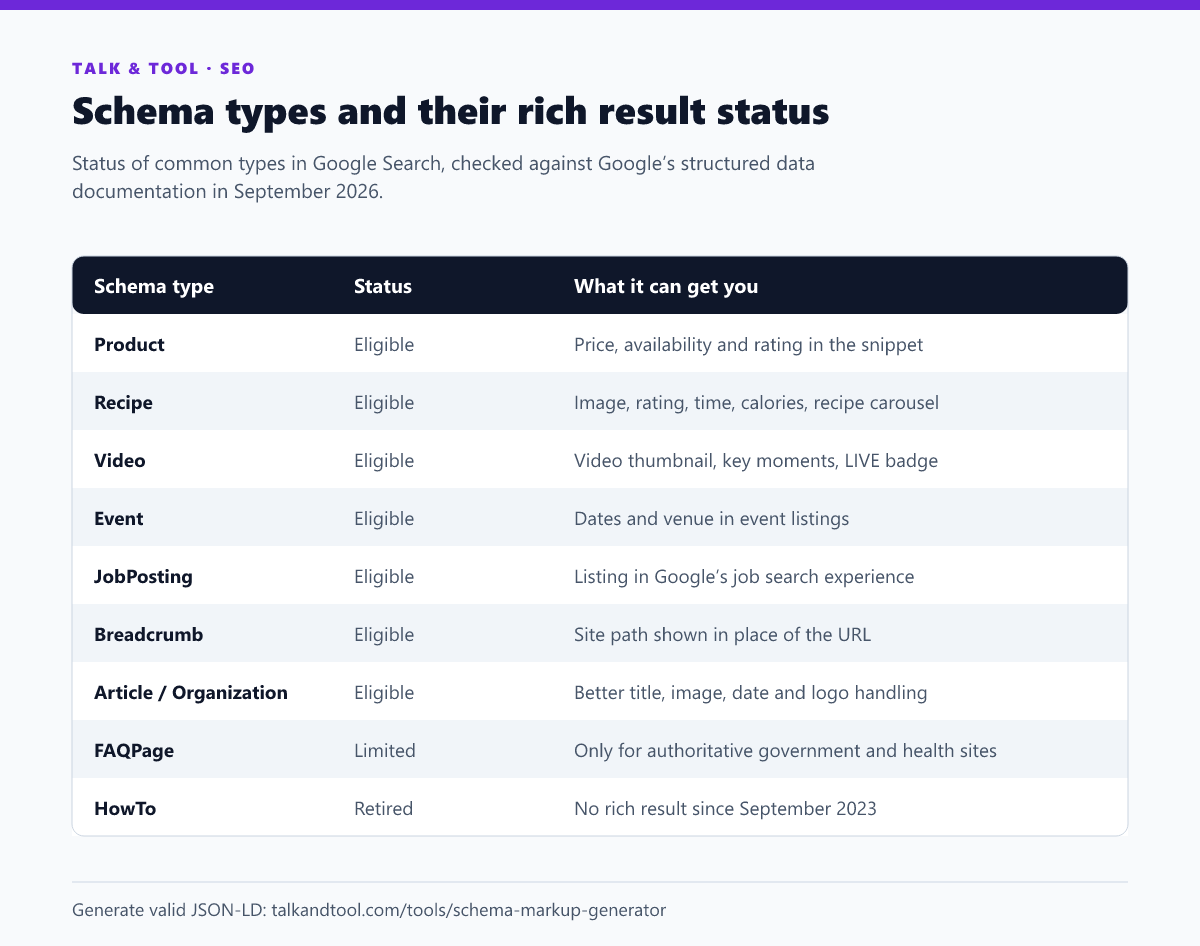
Product, Recipe, Video, Event, JobPosting and Breadcrumb markup still earn rich results in Google in 2026. FAQ rich results are limited to authoritative government and health sites, and HowTo rich results were removed in 2023. Here is the current status of each common type, and which ones are worth adding to your pages.
The current status at a glance
What changed, and when
Google has been trimming the rich results page for several years, with a stated goal of simpler, less cluttered results:
- August–September 2023: FAQ rich results were restricted to well-known, authoritative government and health websites, and HowTo rich results were removed from desktop and mobile.
- November 2024: the sitelinks search box was retired, so WebSite SearchAction markup no longer triggers anything visible.
- 2025: Google announced it was phasing out several less-used result types, including Course Info, Claim Review, Estimated Salary, Learning Video, Special Announcement, Vehicle Listing and Book Actions.
None of this makes the markup invalid. Google simply stopped showing the enhanced display. That distinction matters: removing old FAQ markup is optional, but you should stop expecting it to change your result.
The types worth adding
Product
The most valuable type for anyone selling anything. Product markup can show price, availability, and review stars under your result through product snippets, and makes pages eligible for merchant listing experiences. Merchant listings need stricter fields and a page where the product can actually be bought. Use the product schema generator to get required and recommended fields right.
Recipe
Recipe results still carry images, ratings, cooking time and calories, and can appear in the recipe carousel. Google requires a name and an image, and the more recommended fields you complete, the richer the result.
Video
VideoObject markup makes a video eligible for video results with thumbnails, key moments and a LIVE badge for livestreams. It needs a name, thumbnail and upload date. If your page's main content is a video, this is one of the highest-impact types available. See the video schema generator.
Event and JobPosting
These power dedicated Google experiences rather than just decorating a snippet. Event markup lists your event with dates and venue. JobPosting puts a vacancy into Google's job search, which can drive applications directly. Both have strict required fields and are policed for accuracy, so expired jobs and past events should be removed or marked. The job posting schema generator covers the required set.
Breadcrumb
Breadcrumb markup lets Google show your site's hierarchy instead of a raw URL. It is cheap to add sitewide and makes results easier to scan. Use the breadcrumb schema generator for individual pages, or generate it in your templates.
Article and Organization
These rarely create a dramatic visual change, but they help Google pick the right headline, image, dates, author and logo. Article markup is worth adding to every blog post, and Organization markup belongs on your homepage. See the article schema generator and the organization schema generator.
LocalBusiness
LocalBusiness markup feeds business details into the knowledge panel alongside your Google Business Profile. It is not a standalone rich result and does not replace the Business Profile, but it helps Google connect your site with your listing. Try the local business schema generator.
Should you still add FAQ schema?
For most sites it will not produce a rich result. It is still valid structured data, and some other systems read it. If you already have it, there is no need to remove it. If you are deciding where to spend time, spend it on the types above. The FAQ content itself is still worth having on the page as normal headings and paragraphs. Question-style headings are a natural fit for featured snippets and "People also ask". The FAQ schema generator shows the current eligibility notice before you generate anything.
How to implement structured data correctly
- Use JSON-LD. Google recommends it, and it keeps markup separate from your HTML. One script block per entity is easiest to maintain.
- Mark up only what is visible. Ratings, prices and FAQs in the markup must appear on the page. Hidden or inflated data breaks Google's guidelines and can lead to a manual action.
- Complete required fields first, then recommended ones. Missing required fields make the page ineligible. Missing recommended ones just make the result less rich.
- Validate before publishing. Google's Rich Results Test shows eligibility, and the Schema Markup Validator checks general schema.org syntax.
- Monitor in Search Console. The Enhancements reports list errors and valid items for each supported type.
The schema markup generator builds JSON-LD for each of these types with a live preview and shows each type's current Google status, so you do not spend effort on markup that no longer changes anything.
Frequently asked questions
Does schema markup improve rankings?
Google says structured data is not a general ranking factor. It helps Google understand the page and makes it eligible for rich results, which can raise click-through rate.
Why is my valid markup not showing a rich result?
Eligibility is not a guarantee. Google decides whether to show a rich result per query and per site, based on quality and relevance. Also check the type has not been retired or limited.
Can schema markup hurt my site?
Only if it misrepresents the page, for example fake reviews or prices that differ from the visible ones. That can lead to a manual action that removes rich results.