How to Find Low Competition Keywords (Free Method for New Sites)
Low competition keywords are searches where the current top results are weak: forums, outdated posts, or pages that do not target the query directly. You find them by reading the results page, not by trusting a difficulty score. Here is a free, repeatable method that works for new websites.
What "low competition" really means
Every keyword tool has a difficulty score, and they rarely agree, because most estimate difficulty from the backlinks pointing at the top-ranking pages. That is part of the picture, but it misses the part a new site can exploit: how well those pages actually answer the query.
A keyword is winnable when the searcher's need is not being met well by what ranks today. A page with strong links but the wrong format, or a correct answer buried under 2,000 words of preamble, is beatable. A dedicated, current, well-organised page from a strong brand usually is not, whatever the difficulty score says.
Step 1: Start from what you can genuinely answer
List the topics where you, your product or your tools have something specific to offer. For a site of calculators and converters, that is every calculation people get wrong. For a SaaS product, it is every workflow the product touches. Low competition keywords are useless if your page cannot be the best answer.
Step 2: Expand into long-tail variations
Head terms like "loan calculator" are fought over by banks and comparison sites. The long tail around them is often wide open. Useful modifiers:
- Question forms: how to, what is, why does, can I, should I
- Comparisons: X vs Y, X or Y, difference between X and Y
- Context: for beginners, for small business, for students, in Excel, by hand
- Constraints: without, free, offline, no signup, for Windows
- Specifics: numbers, years, locations, job titles, file formats
The long-tail keyword generator combines a seed term with these modifiers. The low competition keyword finder goes a step further and scores the ideas for how likely they are to be under-served.
Step 3: Read the results page for each candidate
This is the step that matters. Search each candidate in a private window and look at the top ten. You are looking for the signals in the table below.
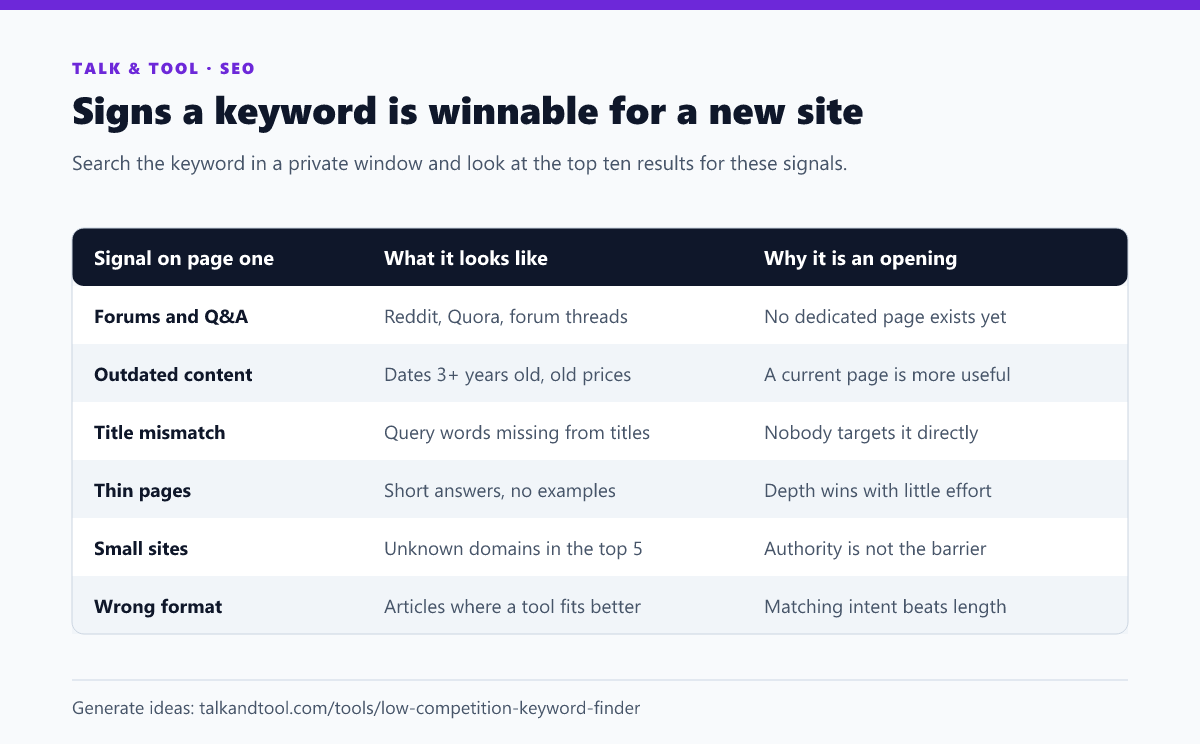
Also note the intent. If page one is all calculators, you need a calculator, not an essay. If it is all how-to guides, a bare tool page will struggle. The search intent classifier helps when the results are mixed. For a fuller walk-through of this manual check, see how to judge keyword difficulty by reading the search results.
Step 4: Use Search Console once you have any traffic
Once a site is indexed, Google Search Console becomes the best low competition keyword tool you have, because it shows queries Google already associates with your pages. Sort the Queries report by impressions and look for:
- Queries with a good position and few impressions. These are low-volume but uncontested, and a dedicated page can own them.
- Queries you rank for by accident. If a general page appears for a specific question, a page built for that question will usually outrank it.
- Page-two positions. These are covered in our guide to striking distance keywords.
A real example from this site: in its first weeks, broad queries like "seo title check" sat around position 70, while specific long-tail queries such as "keyword generator deutsch" and "best keyword cannibalization checker" appeared at positions 6–7. The long tail is where a new domain gets its first clicks.
Step 5: Sanity-check the volume
Low competition and zero demand look the same in a difficulty score. Before writing, confirm people search for the topic at all:
- Google's autocomplete and "People also ask" boxes show the query exists.
- Related searches at the bottom of the results page confirm there is a cluster, not a one-off.
- Free volume ranges from Google Keyword Planner are rough but good enough to separate "tens" from "thousands".
A keyword with 50 searches a month that you can rank first for is worth more than one with 5,000 where you will sit on page five. And a good page picks up dozens of related long-tail variants, so its real traffic is usually several times the headline volume.
Step 6: Group before you write
Several of your candidates will turn out to be the same search in different words. Writing one page per variant splits your signals and creates keyword cannibalization. Cluster them first with the keyword clustering tool and write one strong page per cluster.
Mistakes that waste the effort
- Trusting difficulty scores alone. Always look at the live results.
- Chasing zero-volume keywords. Check demand exists before investing a day in a page.
- Ignoring intent. A beautifully written article cannot rank for a query where Google only shows tools.
- Going too broad too early. A new site earns authority from many small wins, then moves up to harder terms.
Frequently asked questions
What is a good keyword difficulty for a new website?
Most tools suggest under 10–20 on a 100-point scale, but treat that as a first filter only. A low score with a strong, dedicated page in position one is still hard; a higher score with forums ranking can be easy.
Can I find low competition keywords for free?
Yes. Google autocomplete, the results page itself, Search Console and Keyword Planner cover everything you need. Paid tools save time, not insight.
How many low competition keywords should one page target?
One primary keyword plus its close variants, meaning every query that returns mostly the same results. Different intents deserve different pages.