Which Meta Tags Matter for SEO in 2026 (and Which to Delete)
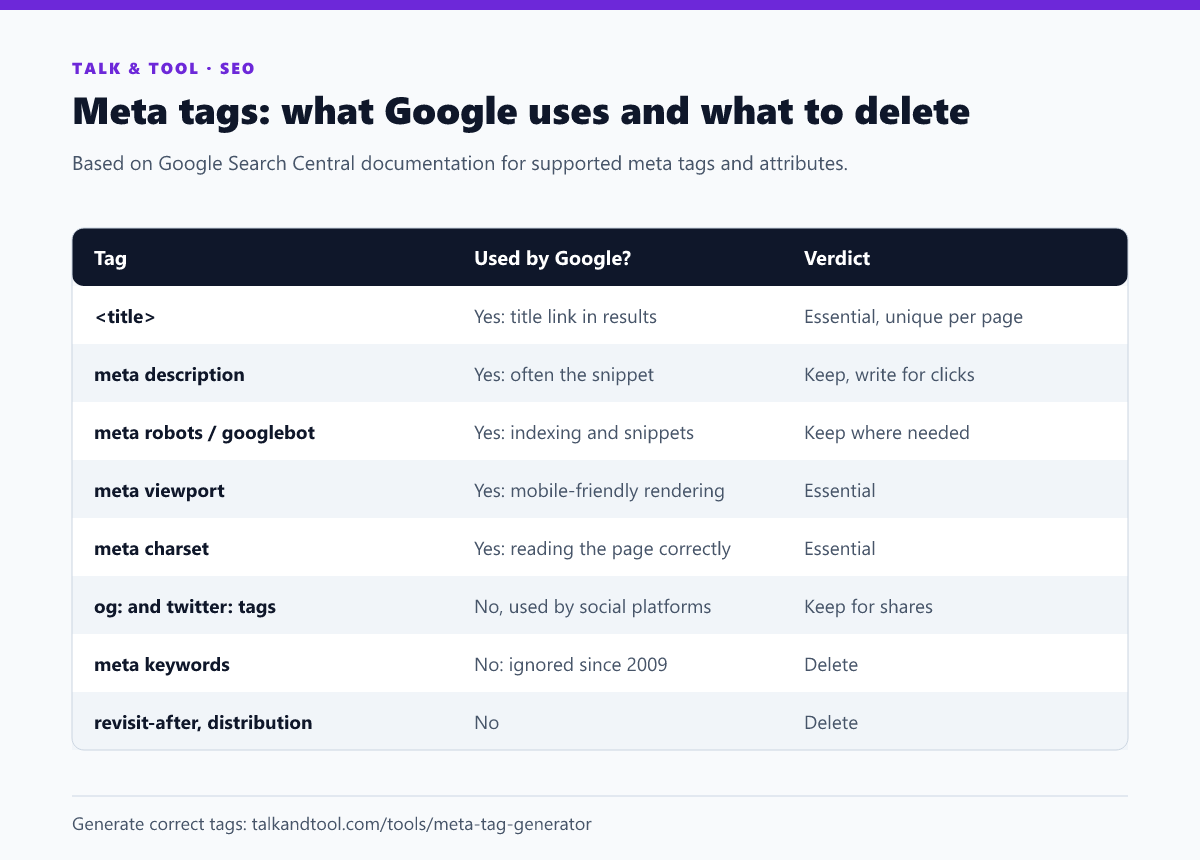
Only a handful of meta tags affect how Google indexes and displays your pages: the title, the meta description, meta robots, viewport and charset. Social tags such as Open Graph matter for shares, not rankings. The meta keywords tag has been ignored by Google since 2009 and can simply be deleted. Here is what each tag does and how to write it correctly.
The quick verdict
The tags that matter
Title
Technically an element, not a meta tag, but it is the most important line in the head. It usually becomes the clickable headline in search results and is a strong relevance signal. One unique, descriptive title per page, roughly 50–60 characters. More in SEO title length and pixel limits.
<title>Loan Calculator: Monthly Payment and Total Interest</title>Meta description
Not a ranking factor, but Google often uses it as the snippet under your title, and the snippet decides the click. About 150–160 characters, specific to the page, leading with the answer or benefit.
<meta name="description" content="Work out your monthly loan payment, total interest and payoff date. Free, instant, and it shows the full amortization schedule.">Meta robots
Controls indexing and snippet behaviour. You only need it when you want something other than the default (index, follow):
noindexkeeps a page out of search results. Use it for thank-you pages, internal search results and thin tag archives.nofollowtells Google not to follow links on the page. It is rarely needed at page level.max-snippet,max-image-previewandmax-video-previewcontrol snippet length and preview size.max-image-preview:largelets Google use large images in Discover and results.nosnippethides the text snippet entirely. It is rarely a good idea.
<meta name="robots" content="index, follow, max-image-preview:large">Important: a noindex only works if Google can crawl the page. Blocking the URL in robots.txt as well means Google never sees the noindex. The robots.txt generator helps keep the two consistent, and how to remove a page from Google search explains the order to do things in.
Viewport and charset
Neither is glamorous, and both are essential. Without a viewport tag, mobile browsers render the page at desktop width, and Google indexes the mobile version. Without a declared charset, special characters can turn into garbage.
<meta charset="utf-8">
<meta name="viewport" content="width=device-width, initial-scale=1">
Open Graph and Twitter tags
These control the title, description and image when a link is shared on social platforms and messaging apps. They do not affect Google rankings, but a shared link with a proper image gets far more clicks than a bare URL. At minimum: og:title, og:description, og:image (1200×630 works everywhere), og:url and twitter:card.
Head elements that are not meta tags but belong in the audit
- Canonical (
<link rel="canonical">) tells Google which URL is the main version when the same content is reachable at several addresses. Every indexable page should have a self-referencing canonical. - Hreflang (
<link rel="alternate" hreflang="…">) connects language versions of a page. It is essential for multilingual sites, and every version must link to all the others, including itself. - Structured data (JSON-LD scripts) is not a meta tag, but it is often the most valuable thing in the head. See which schema markup still gets rich results.
The tags to delete
Meta keywords
Google announced in 2009 that it does not use the keywords meta tag in web ranking, and that is still true. Worse, the tag publishes your target keyword list for competitors to read. Some search engines have described keyword-stuffed meta keywords as a spam signal. Delete it.
Other leftovers
revisit-after, distribution, rating (unless you need to mark adult content), copyright, language and generator do nothing for Google Search. language in particular is ignored. Google detects language from the content, and you declare it properly with the lang attribute on the <html> element plus hreflang.
They are harmless but add clutter and, in the case of generator, advertise your CMS version to anyone scanning for vulnerable installs.
Generate the full set in one go
The meta tag generator produces the title, description, robots, canonical, Open Graph and Twitter tags together from one form, so the social and search versions never drift apart. Then check the result with the title and description checker to confirm nothing will be truncated.
Frequently asked questions
Do meta tags still matter for SEO?
A few do. The title and robots directives directly affect ranking and indexing, and the description affects clicks. Most other meta tags do not affect Google Search at all.
Should I add a meta keywords tag?
No. Google ignores it, and it reveals your keyword targets to competitors.
Where do meta tags go?
Inside the <head> of the HTML. Google reads meta tags only from the head, and tags placed in the body may be ignored.