How to Calculate Days Between Two Dates (By Hand and in Excel)
To count the days between two dates, convert each date to its day number in the year and subtract. From 15 January to 27 September 2026 is 270 − 15 = 255 days. In Excel, subtract one date cell from the other. Below are the manual method, the spreadsheet formulas, and the two details that trip people up: leap years and whether to count both ends.
Method 1: day of year, then subtract
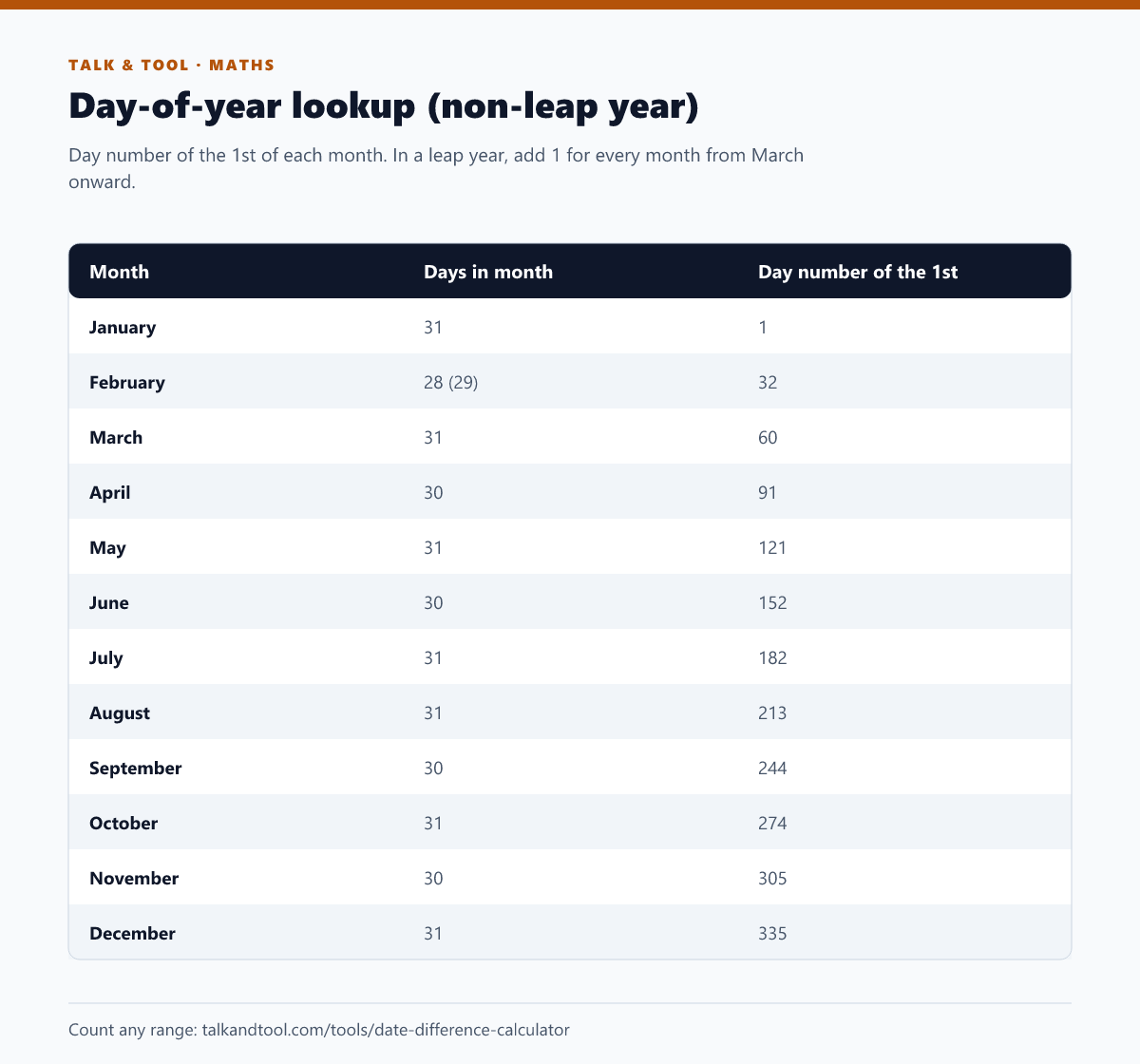
Every date has a position in the year, from day 1 (1 January) to day 365, or 366 in a leap year. Look up the day number of the 1st of the month, then add the day of the month minus one.
Example 1: 15 January to 27 September 2026.
- 15 January = day 15
- 27 September = 244 + 26 = day 270
- Difference: 270 − 15 = 255 days
Example 2: 1 March to 25 December 2026.
- 1 March = day 60
- 25 December = 335 + 24 = day 359
- Difference: 359 − 60 = 299 days
Across a year boundary, count the days left in the first year and add the day number in the second. 20 December 2026 to 10 February 2027: 2026 has 365 − 354 = 11 days left, plus day 41 of 2027, equals 52 days.
Leap years
A year is a leap year if it is divisible by 4, except century years, which must be divisible by 400. 2024 and 2028 are leap years. 2026 is not. 2000 was a leap year, and 1900 and 2100 are not. In a leap year, February has 29 days, and every date from 1 March onward is one day number later than in the table.
A quick check: 1 February to 1 March is 29 days in 2024 and 28 days in 2026.
Inclusive or exclusive: the off-by-one question
Subtracting dates gives the number of days between them, excluding the start day. That is what "how many days until" usually means. But if you are counting days of a hotel stay, a course, or leave that includes both the first and last day, add one.
- Monday to Friday of the same week by subtraction: 4 days.
- Monday to Friday counting both days, such as days worked: 5 days.
Most disagreements between two people's counts come down to this, so state which one you mean.
Method 2: Excel and Google Sheets
Spreadsheets store dates as serial numbers, one per day, so subtraction just works:
=B1-A1: days between the dates. Format the cell as a number, not a date.=B1-A1+1: inclusive count.=DATEDIF(A1,B1,"d"): the same as subtraction. It also takes "m" (whole months) and "y" (whole years), which is handy for ages and anniversaries. The start date must be earlier than the end date, or DATEDIF returns an error.=DAYS(B1,A1): the same result, with the end date first.=NETWORKDAYS(A1,B1): weekdays only, counting both the start and end dates. Add a range of holiday dates as a third argument to exclude them.
Example: =NETWORKDAYS("2026-03-01","2026-12-25") returns 215. 1 March 2026 is a Sunday, so it is not counted, while 25 December 2026 is a Friday and is counted. Subtract public holidays for your country to get real working days.
Weeks, months and years
- Weeks: divide the days by 7. 255 days is 36 weeks and 3 days.
- Months: count whole calendar months, then the remaining days. Months are not a fixed length, so "days ÷ 30" is only an approximation.
- Years: for ages, count whole years since the last birthday. The age calculator gives years, months and days exactly.
Business days and deadlines
If you need working days rather than calendar days, such as for contract notice periods, delivery estimates or payment terms, exclude weekends and public holidays. The working days calculator does that, and our guide to calculating business days and deadlines covers the rules that decide whether a deadline lands on day 10 or day 11.
To go the other way, finding the date that is 90 days from today, use the add or subtract days tool. For any two dates, the date difference calculator shows days, weeks, months and years at once, with an option to exclude weekends.
A note for developers
Calculating date differences in code goes wrong most often around time zones and daylight saving. A "day" that crosses a clock change is 23 or 25 hours long, so dividing milliseconds by 86,400,000 can give 254.96 instead of 255. Compare calendar dates in UTC, or use a date library's day-difference function. More in how to store dates and times without time zone bugs.
Frequently asked questions
How many days are there between two dates, including both?
Subtract the dates and add one. From 1 to 10 June is 9 days by subtraction, or 10 days counting both.
How long is 40 business days?
Eight working weeks, so about 56 calendar days, or longer if public holidays fall in the period.
Why does Excel show a date instead of a number?
The result cell inherited date formatting. Change the cell format to Number or General.