Hreflang Tags: How to Add Them Correctly (HTML, Header, Sitemap)
Hreflang tags tell search engines which language and region each version of a page is meant for, so a searcher in Germany is shown your German page and a searcher in Spain your Spanish one. They do not boost rankings by themselves; they help Google pick the right version among pages that already exist. This guide covers the syntax, the three ways to add the tags, and the rules that decide whether they work.
What hreflang does and does not do
If you have the same page in several languages (or in one language for several regions, such as English for the US and the UK), Google can treat them as duplicates or show the wrong one. Hreflang links the versions into a group and tells Google to swap in the best match for each searcher's language and location.
It does not translate anything, it does not consolidate ranking signals the way a canonical tag does, and it only works between pages that are genuine alternates of each other. It is also a hint rather than a command: Google may still show a different version if it judges that better. If you have only one version of each page, you do not need it.
The syntax
Each annotation has a language code, an optional region code and a URL:
<link rel="alternate" hreflang="en-GB" href="https://example.com/uk/" />
- Language: a two-letter ISO 639-1 code in lowercase, such as
en,de,es. - Region (optional): a two-letter ISO 3166-1 code in capitals after a hyphen, such as
en-GBores-MX. You cannot use a region on its own. - x-default (optional): the page to show when no listed language fits, normally a language selector or your main version.
- URL: absolute, with the protocol, exactly as the page's canonical URL.
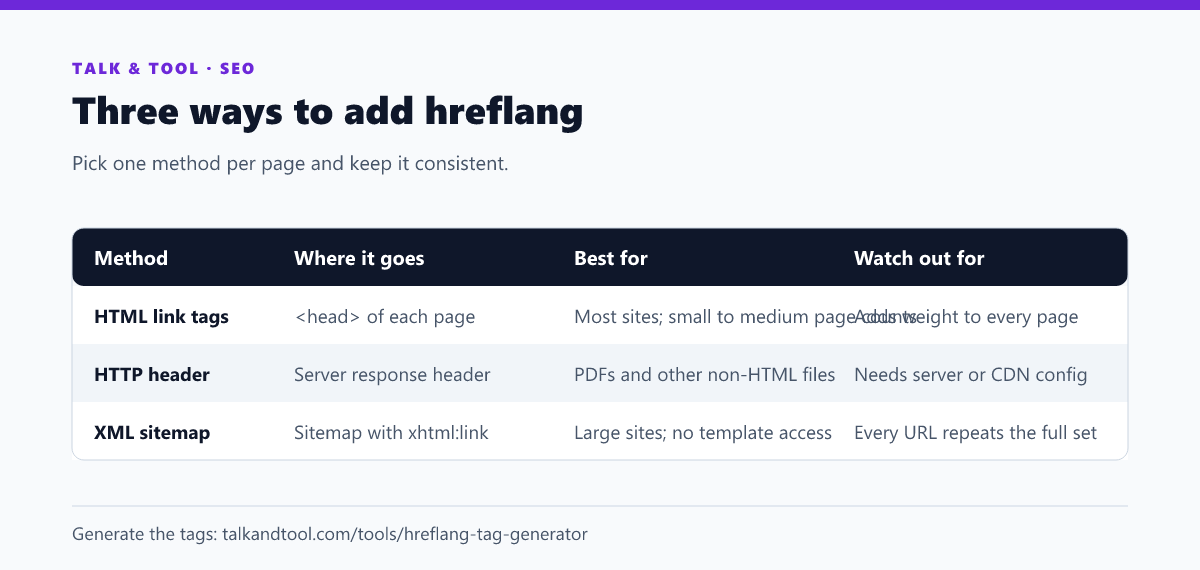
Method 1: HTML link tags
Place one tag per version in the <head> of every version, including a tag that points to the page itself. For a site in English, German and Spanish, every one of the three pages carries all of these:
<link rel="alternate" hreflang="en" href="https://example.com/" />
<link rel="alternate" hreflang="de" href="https://example.com/de/" />
<link rel="alternate" hreflang="es" href="https://example.com/es/" />
<link rel="alternate" hreflang="x-default" href="https://example.com/" />
The hreflang tag generator writes this set from a list of languages and URLs, and flags invalid codes.
Method 2: HTTP headers
For files that have no <head>, such as PDFs, send the annotations in the response header:
Link: <https://example.com/guide.pdf>; rel="alternate"; hreflang="en", <https://example.com/de/guide.pdf>; rel="alternate"; hreflang="de"
This needs a server or CDN rule to set the header, so it is usually used only where HTML tags are not possible.
Method 3: XML sitemap
You can place the annotations in your sitemap instead of the pages. Each <url> entry lists itself and every alternate as xhtml:link elements, and the urlset must declare the xhtml namespace. It is easier to maintain on a large site, because you change one file instead of every template. The same generator produces this format.
The four rules that matter
- Return links. If page A points to page B, page B must point back to A. A one-way annotation is ignored. This is the most common failure.
- Self-reference. Every page lists itself among its alternates.
- Canonical URLs. The URLs in the tags must be the canonical, indexable version of each page: no redirects, no noindex, no parameters that canonicalise elsewhere.
- Valid codes. "en-UK" and "jp" are not valid; use
en-GBandja. Underscores such asen_USare wrong as well.
Mistakes in any of these can cause Google to disregard the whole group, which is why a generator that validates is safer than typing the tags by hand. See also the x-default tag and common hreflang errors.
Which method should you choose?
Use HTML tags unless you have a reason not to. Choose the sitemap if you have thousands of pages or cannot edit the templates, and the HTTP header for non-HTML files. Do not mix methods for the same page unless the sets are identical, because conflicting annotations are harder to debug. After you ship, check your coverage in the pages report in Search Console and make sure each version is still being indexed. Related tooling: the meta tag generator covers the rest of the head.
Frequently asked questions
Do I need hreflang for a site with several countries but one language?
Only if the pages differ by region, for example prices or spelling for the US and UK. If the content is identical, hreflang adds little and the pages may be treated as duplicates.
Does Bing use hreflang?
Bing says it relies mainly on the HTML lang attribute and the content-language header rather than hreflang, so set those correctly as well.
Can I use hreflang across different domains?
Yes. The URLs can be on different domains or subdomains, as long as each page links back to the others.
How long until it takes effect?
Google needs to recrawl every page in the group, so expect days to weeks. Errors do not always raise a visible warning, so test with a validator.