Open Graph Tags: The Complete List and Image Size Guide
Open Graph tags are meta tags in a page's head that control how it looks when someone shares the link on Facebook, LinkedIn, Slack, WhatsApp, iMessage and most other apps: the title, description and preview image. Without them, each platform guesses, often badly. Four tags are required, a few more are recommended, and getting the image right matters most. This guide lists them all, gives the image size to use, and explains why previews sometimes show stale information.
The four required tags
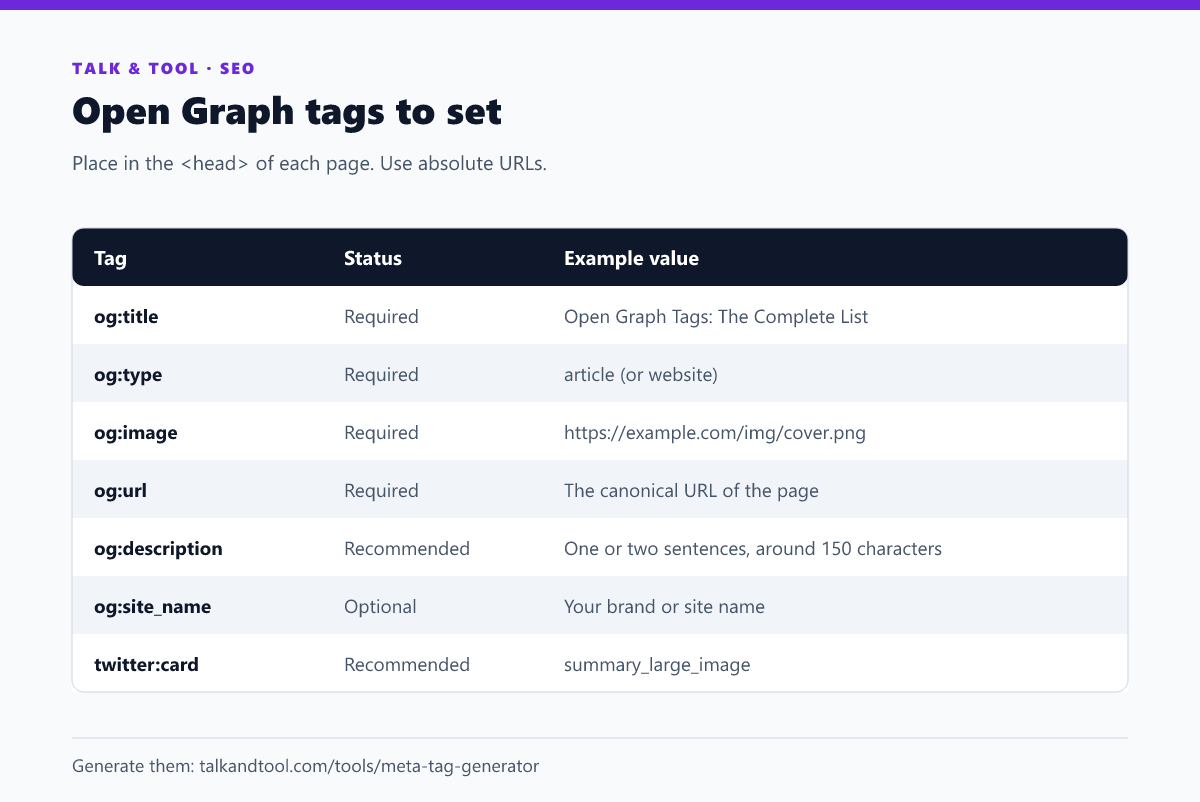
The Open Graph protocol requires these four on every page:
og:title: the title as it should appear in the preview, which can be shorter or punchier than the HTML title.og:type: the kind of object, usuallywebsitefor a home page andarticlefor a post.og:image: the image URL. It must be absolute and publicly reachable.og:url: the canonical URL for the page, so shares of different URL variants count together.
Recommended and optional tags
og:description: a sentence or two. Keep it near 150 characters, since platforms truncate it.og:site_name: your brand, shown above or below the title on some platforms.og:locale: for exampleen_US. For translated pages,og:locale:alternatelists the others.og:image:alt: alternative text for the image, which helps screen-reader users.og:image:widthandog:image:height: letting a platform render the preview on the first share, without downloading the image first.article:published_time,article:author: extra metadata for posts.
A complete example
<meta property="og:title" content="Open Graph Tags: The Complete List" />

<meta property="og:type" content="article" />

<meta property="og:url" content="https://example.com/open-graph-tags" />

<meta property="og:image" content="https://example.com/img/og-tags.png" />

<meta property="og:image:width" content="1200" />

<meta property="og:image:height" content="630" />

<meta property="og:image:alt" content="Diagram of a link preview card" />

<meta property="og:description" content="Every tag worth setting, and the right image size." />

<meta property="og:site_name" content="Example" />
Note that Open Graph uses property rather than name in the tag. Some parsers accept either, but property is the specified form. The meta tag generator writes the full block, including the Twitter tags below.
The best og:image size
Use 1200 × 630 pixels, an aspect ratio of about 1.91:1. This fills the large-image card on Facebook and LinkedIn and displays well on most other platforms. Practical rules:
- Use PNG or JPG. Some platforms do not display WebP or SVG previews, so avoid them for this tag.
- Keep important content, such as text and faces, away from the edges. Some apps crop to a square or a different ratio.
- Keep the file size modest, ideally well under a megabyte. Heavy images load slowly and some crawlers give up.
- Put readable text on the image, but keep it large; it will often be shown small.
- Use a unique image per page where you can. A single generic logo on every share looks like spam.
Twitter/X cards
X reads its own twitter: tags first and falls back to Open Graph for anything missing. In practice you only need one extra tag:
<meta name="twitter:card" content="summary_large_image" />
Without it, X shows a small square "summary" card. The common values are summary and summary_large_image. If you set the title, description and image through Open Graph, X will use them. Add twitter:title, twitter:description or twitter:image only if you want them to differ.
Why my preview shows old or missing information
- It is cached. Platforms store the first preview they fetch. After you change tags, ask them to refresh: Facebook has a Sharing Debugger, and LinkedIn has a Post Inspector. Slack and messaging apps cache for a while and may need a different URL, such as one with a query string, to refetch.
- The crawler cannot reach the page. Pages behind a login, blocked by robots.txt or rendered only by JavaScript may show nothing. The tags must be in the HTML the server returns, not added later by script.
- The image URL is relative or broken. Use a full https URL that loads without cookies.
- The tags are in the wrong place. They belong inside the head. A tag in the body can be ignored.
- Two sets of tags conflict. A plugin and a theme can each add their own; the crawler may read the wrong one. View the page source and check for duplicates.
How it relates to your other meta tags
Open Graph controls the social preview, while the title tag and meta description control the search result. They can be the same text or different. Keep the search title within its display limit (see SEO title length), and check the meta tags that matter for SEO for the rest. Social shares do not directly affect rankings, but a clear preview earns more clicks on the link, which is what you want from a share. If you run a multilingual site, hreflang tags handle the language targeting for search.
Frequently asked questions
Is og:description needed if I have a meta description?
Platforms fall back to the meta description if there is no og:description, but setting it lets you write copy that suits a feed, not a search result.
Can I use a different og:image for each page?
Yes, and you should. A distinct image per page makes each share stand out.
Do Open Graph tags help SEO?
Not directly. They improve how shared links look, which can increase clicks and visibility, but Google does not use them as a ranking signal.
How do I test my tags?
View the page source to confirm they are present, then paste the URL into the Facebook Sharing Debugger or LinkedIn Post Inspector to see exactly what each platform reads.