Product Schema Markup: Required Properties and a JSON-LD Example
Product schema is structured data that tells search engines the name, price, availability and reviews of something you sell, so the listing can appear in results with rich details such as a price, a star rating or a stock label. Google needs a small set of properties to consider a page, and a larger recommended set improves how well the product is matched. This guide gives the properties that matter, a complete JSON-LD example and the mistakes that most often block rich results.
Which properties does Google need?
Google supports two product experiences, and they have different requirements:
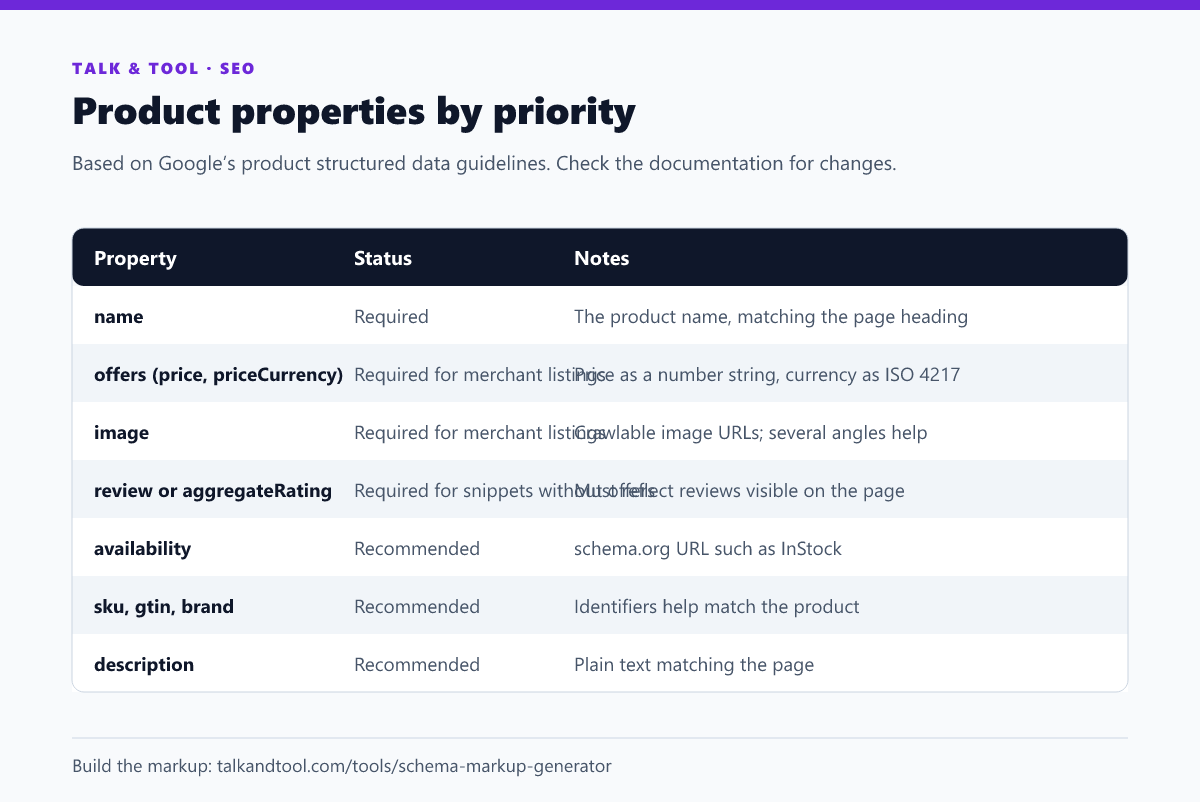
- Product snippets are rich details on a regular search result. A page needs
nameplus at least one ofreview,aggregateRatingoroffers. - Merchant listings are the richer shopping experiences, such as product knowledge panels and listings. They need
name,imageandofferswithpriceandpriceCurrency.
Beyond the minimum, recommended properties such as description, sku, gtin, brand and availability give Google more to work with. Requirements change over time, so verify them against Google's current product structured data documentation.
A complete JSON-LD example
Place this in a <script type="application/ld+json"> tag in the page's head or body. JSON-LD is Google's recommended format because it stays separate from the visible HTML.
{

  "@context": "https://schema.org",

  "@type": "Product",

  "name": "Trail Runner 2 Running Shoes",

  "image": ["https://example.com/img/trail-runner-2-front.jpg", "https://example.com/img/trail-runner-2-side.jpg"],

  "description": "Lightweight trail running shoes with a grippy outsole.",

  "sku": "TR2-BLU-42",

  "brand": { "@type": "Brand", "name": "Example Outdoors" },

  "offers": {

    "@type": "Offer",

    "url": "https://example.com/shoes/trail-runner-2",

    "price": "89.00",

    "priceCurrency": "USD",

    "availability": "https://schema.org/InStock"

  },

  "aggregateRating": { "@type": "AggregateRating", "ratingValue": "4.6", "reviewCount": "128" }

}
The schema markup generator builds this from a form and validates it as you go, so you do not have to hand-edit the brackets.
The properties, one by one
name and description
Use the same name shown on the page. Keep the description to plain text that matches the visible description.
image
Give crawlable, indexable image URLs. Multiple images in different aspect ratios help Google choose the best one for each surface.
offers
The price must be a plain number in a string, with a dot as the decimal separator and no currency symbol or thousands separator: "89.00", not "$89". The currency goes in priceCurrency as a three-letter ISO 4217 code. availability takes a schema.org URL such as https://schema.org/InStock, OutOfStock or PreOrder.
aggregateRating and review
Mark up ratings only if the reviews are visible to users on the same page and come from real customers. Do not invent ratings, mark up a rating you wrote about your own product, or copy ratings from another site. Misleading markup can lead to a manual action and removal of rich results.
sku, gtin and brand
Identifiers let Google match your product to the same item sold elsewhere. Use the real GTIN (barcode) if you have one.
Common mistakes
- Markup that does not match the page. The price, availability and rating in the markup must match what visitors see. A mismatch is the most common reason rich results are withheld.
- Currency symbols in price.
"$89"and"89,00"fail validation. Use"89.00". - Marking up a category page as one product. Product markup is for a page about one product, not a list of many.
- Blocked images or pages. If robots.txt or noindex blocks the page or its images, Google cannot use them.
- Stale data. A price or stock status that is out of date can lead to disapprovals. If the page is generated, make the markup generated from the same data.
- Treating markup as a ranking boost. It makes a page eligible for rich results; it does not by itself raise rankings.
Testing and monitoring
Test with Google's Rich Results Test, which shows which features your markup qualifies for, and the Schema Markup Validator for syntax. After you deploy, watch the enhancement reports in Search Console for errors and warnings. For the bigger picture of which types still earn rich results, see schema markup and rich results in 2026, and for the other tags in your head see the meta tags that matter.
Frequently asked questions
Do I need Product schema on every product page?
It is worth having on any page where you want a price, rating or stock status to be eligible for display. Generate it from the same data as the page so it stays correct.
Can I use microdata instead of JSON-LD?
Yes, Google supports microdata and RDFa, but JSON-LD is recommended and easier to maintain.
Why are my stars not showing?
Eligibility is not a guarantee. Check that the markup is valid, matches the page, the reviews are visible and genuine, and that Google has recrawled the page. Even then, Google decides whether to show them.
What if a product has several variants?
Mark up each variant that has its own URL on its own page. For variants on one page, follow Google's guidance on product variants so the right offer is selected.